If you’re wondering how to make your golf cart go faster, you’ve come to the right place. Small upgrades like adjusting tire pressure or upgrading batteries can significantly boost your speed — sometimes by 25 to 30 percent.
Here’s the good news: with a few simple checks and simple modifications, you can unlock more power and performance from your cart.
Keep reading for practical tips on how to safely increase your golf cart’s speed.
Why Your Golf Cart Feels Slow: Start With These Quick Checks
To improve your golf cart’s speed, start by checking your tire pressure. Ensure all four tires are inflated to the manufacturer’s recommended PSI, usually between 15 and 25 psi. A soft tire increases rolling resistance, which makes the cart feel sluggish. Also, inspect the tires for worn spots or uneven tread, as these can reduce traction and hinder performance. Properly inflated tires not only help the cart run faster but also extend tire life and improve handling. For maximum efficiency, also ensure your battery connections are clean and free of corrosion, as poor electrical contact can limit power delivery and overall speed. Upgrading to top Yamaha parts can further boost performance and reliability for your specific cart model. Upgrading your sound system with magnetic speakers can enhance your ride experience without affecting speed.
Test Your Batteries Under Load Before Any Upgrade
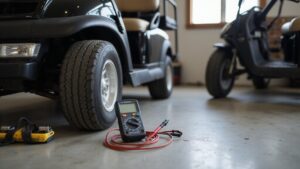
Before upgrading your speed, always load test your batteries to ensure they can actually deliver the necessary power. Load testing reveals how your batteries perform under stress, not just when resting. Use a carbon-pile tester set to 50% of your battery’s cold-cranking amps (CCA) rating. Apply the load for 10 to 15 seconds, and check the voltage. For 6V batteries, it should stay above 5.1 volts; for 12V batteries, above 10.5 volts. A sharp voltage drop indicates reduced capacity or internal damage, which can limit your cart’s top speed. One weak battery in a series pack can mimic drivetrain issues. Always test each battery individually after fully charging and resting them. For consistent power delivery, LED headlights also require stable voltage to function without flickering. Skipping this step risks spending money on upgrades that won’t improve performance. For reliable power, consider selecting a top deep cycle battery reviewed specifically for golf carts. For example, a high-quality lithium battery often provides more consistent voltage under load compared to traditional lead-acid options.
Switch to Lithium for a Lighter, Faster Ride
Switching to lithium batteries can significantly enhance your cart’s performance by reducing weight and improving responsiveness. A 48V lithium pack weighs roughly 50 to 120 pounds, compared to 150 to 400 pounds for a lead-acid pack of similar voltage. This reduction of 100 to 300 pounds decreases the load on your motor, leading to quicker acceleration and better hill climbing with increased torque. If you are considering whether to lease or buy, golf cart leasing can be a cost-effective way to test upgraded battery performance without a large upfront investment. Lithium batteries also maintain voltage levels much more consistently than lead-acid. Unlike lead-acid, which experience voltage sag during hard acceleration or during hill climbs, lithium keeps power delivery steady. This results in a sharper, more reliable response throughout your ride. For an even smoother auditory experience while driving, pairing your upgraded cart with a top soundbar for golf carts can enhance the enjoyment of your faster ride. Additionally, lithium batteries charge faster, typically in 2 to 4 hours versus 8 to 12 hours for lead-acid, allowing you to recharge efficiently between rounds. Overall, switching to lithium makes your cart lighter, more agile, and faster with every press of the pedal. For those researching options, buyers often compare top lithium batteries for golf carts to ensure they choose a reliable upgrade.
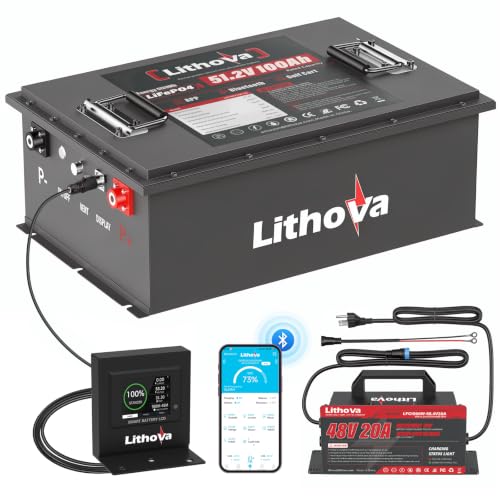
Get Rid of Lead Acid Batteries Now: Revolutionize your golf cart with Lithova 48V golf cart lithium conversion kit! This 48V lithium battery directly replaces 6-8V 100Ah heavy lead-acid batteries in one simple installation. Enjoy 74% weight reduction, 60% smaller size, and extended 50-mile range (effortless 7-9 Rounds of 18-hole courses). Lasts 8x longer than lead-acid batteries, Up to 15000 deep cycles ensure maintenance-free performance and long-term reliability.

Born for 48V Golf Cart: Special designed for 48v golf cart industry, OGRPHY 48v lithium golf cart battery is compatible with golf cart controllers of all major brands on the market. Built in premium grade A prismatic LiFePO4 cells(UL certified), this 48v battery has better durability & safety. Over 5kWh capacity equals 8pcs 12V 100AH lead acid batteries. Max 10.24kW continuous power & peak 51.2kW power (50% more powerful than standard lithium batteries) to conquer hills/rough terrain effortlessly.
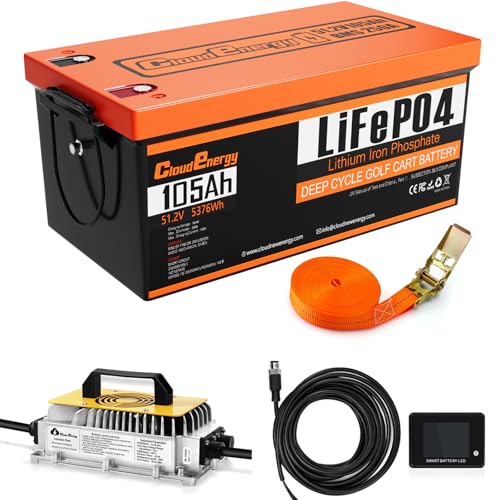
24 Hours Customer Service: Cloudenergy provides technical support and online customer service with fast feedback within 24 hours for any product-related issues or questions
Go From 48V to 72V for a Major Speed Boost
Jumping from 48V to 72V can deliver a 25–30% top-speed increase, significantly boosting your cart’s performance. This upgrade not only benefits top speed but also enhances acceleration and hill-climbing ability. The higher voltage reduces current draw, which minimizes voltage sag under load, leading to more consistent performance. For those seeking the best value, top lithium golf carts often come with advanced battery management systems that support such upgrades. For instance, manufacturers like Racka Golf Carts prioritize robust construction, which helps ensure the frame can withstand the added stress of higher voltage conversions. A compatible 24 volt battery charger is essential for safely charging the new higher-voltage pack.
However, this isn’t a simple battery swap. You need to replace the entire electrical system, including the battery pack, charger, solenoid, cables, and DC-DC converter. Your controller must be rated for 72V and properly programmed. Most importantly, your motor has to handle the increased RPM and voltage—running 48V hardware at 72V risks overheating and damage.
Proper calibration of the new battery chemistry and precise voltage regulation across the system are essential. Expect to spend between $3,000 and over $6,000 for a safe, reliable conversion. This process requires checking compatibility of all components and professional guidance is highly recommended before proceeding.
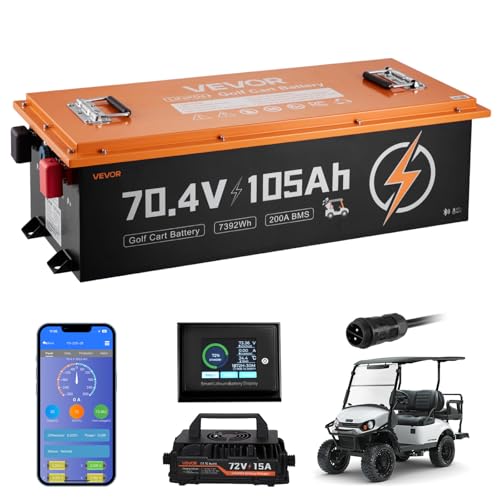
Effortless Hill Climbing: The 70.4V LiFePO4 golf cart battery delivers a 2C discharge rate, providing 200A continuous discharge and 300A peak current(30s). Climb hills effortlessly, take your golf game to the next level with reliable performance

✔️ [12 Years & 6000+ Cycles]: VPauexii 72V lithium conversion kit. Built with new Grade A EV LF105 cells. 12-year lifetime and 6000+ deep cycles isn't just a claim—it's the result of our quality commitment. Full 5-year warranty. No hidden costs. Premium performance, advanced safety. The smartest value today.

【Designed for 72V golf cart battery & Peak 1000A】Lighter and with higher energy density than ordinary 72V LifePo4 batteries, Continuously delivers 200A of discharge current to your golf cart/sightseeing bus, with a peak instantaneous current of 1000A/1s. It can easily accommodate 6 people for 10+ rounds of continuous golf (60~80 miles). Perfectly compatible with golf cart brands such as EZGO, Club Car, Yamaha, and ICON.
Upgrade Your Controller for the Biggest Speed Gain
Upgrading your controller can add 3 to 7 mph to your top speed, making it the most impactful electric modification for performance. Stock controllers are typically tuned conservatively to prioritize battery longevity, but replacing them with programmable units unlocks significant power. By increasing amp output to 400 amps for street use or over 500 amps for off-road conditions, you’ll experience not only higher top speeds but also stronger acceleration and better hill-climbing ability. If your battery is not holding a charge or the cart won’t move, check for battery charging issues like a failed charger, corroded terminals, or a dead cell before upgrading the controller. For guidance on selecting the best model, read reviews of top controllers for golf carts to compare options that match your needs. Tuning your controller allows you to customize top speed, throttle response, and regenerative braking through handheld or software tools. Compatibility is key: ensure your controller matches your cart’s make, model, and throttle type. When upgrading to higher amps, you’ll likely need upgraded cables and connectors to handle the increased power safely. Always disconnect the power before installation to prevent shorts or damage. Keep in mind that the gains from your controller depend on your motor and battery capacity—it’s a smart upgrade when those components can support the additional power. Understanding what does a golf cart controller do clarifies why this upgrade is so effective for performance.


Swap Your Motor and Gearing for More Speed
To push past the speed limits of a motor swap alone, you need to pair that new motor with a gear ratio change. Lowering the gear ratio, such as switching from a 12:1 ratio to an 8:1 ratio, directly increases your top speed because each motor revolution spins the wheels more times. When choosing your gear ratio, aim for a lower numerical value to maximize speed, but remember that this comes with tradeoffs. Reducing the gear ratio decreases torque, which can compromise hill-climbing ability. An 8:1 ratio provides a good balance for mixed terrain, while a 6:1 ratio is better suited for flat surfaces only. One successful upgrade involved switching from a 12:4 to a 6:1 ratio, which reduced torque requirements and improved performance. For drivers needing to carry heavy loads, such as on models reviewed in cargo box carts, the torque loss from a very low ratio can make the vehicle feel sluggish on inclines. For example, a 48V system can further hinder torque output if the controller is not properly matched to the new gearing. You should also verify the model year of your cart to ensure the correct parts are compatible.
Before purchasing parts, always calculate your potential new speed using the motor’s RPM, the gear ratio, and your tire diameter. Overgearing can lead to excessive torque loss, making your motorcycle feel sluggish and reducing overall performance. Matching your motor compatibility—ensuring it can handle the newly adjusted gear ratio and your controller’s specifications—is essential for safe and optimal operation. When done correctly, this combination can unlock significant speed gains that cannot be achieved by simply swapping or upgrading the motor alone.
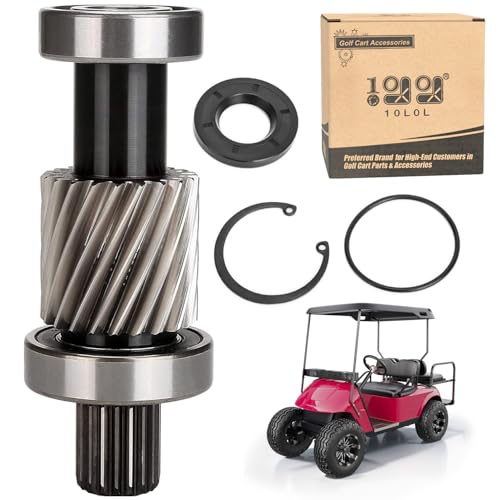
Golf Cart Input Shaft Kit, includes shaft(21 tooth), bearings

Perfectly Used for DIY Go Kart, Trike, Tricycle, Dolly ,Electric Car ,Golf Cart, ATV Quad, 4 Wheelers

Powerful 72V 1500W Brushless Motor: Equipped with a high-efficiency differential motor delivering up to 4800 RPM and 3.3Nm torque, ideal for high-speed go karts, ATVs, and electric drift trikes.
Install Larger Tires for Faster Golf Cart Speed
Installing larger tires can boost your golf cart’s top speed significantly. Moving from 18-inch to 22-inch tires can increase your speed by about 22%, translating to an extra 2 to 4 mph in real-world conditions. Keep in mind, larger tires also mean reduced torque, which affects acceleration and hill-climbing ability. This upgrade works best on flat terrain and should be paired with appropriate modifications like a lift kit to ensure proper fitment and safety.
Before purchasing, check your cart’s specifications. Most stock models can fit up to 20-inch tires without any lift. For 22-inch tires, a 4-inch lift kit is necessary, while 23-inch tires require a 6-inch lift. Also, verify that your tire tread pattern and wheel alignment maintain safe steering and braking performance. Remember, a tire swap will cause your speedometer to read lower than actual speed. This is a straightforward upgrade that doesn’t involve wiring, but pairing it with the right lift ensures the best results.

EXCEPTIONAL PERFORMANCE: All-Terrain traction is ideal for all driving conditions and weather, and robust sidewall provides impact protection and improved traction in loose terrain
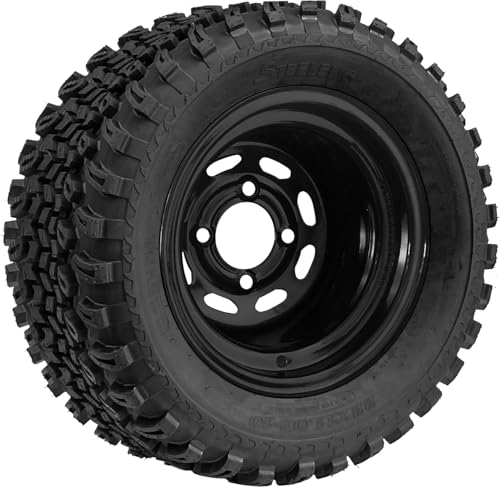
Includes: (4) 22x11-10 All Terrain Tires, (4) 10"x7" Black Steel Wheels

22x11.00-8 Golf Cart Tires and Wheels - Includes 4 pre-mounted ATW-013 tire and 8x7 matte black steel wheel assemblies for compatible golf cart applications.
Fix Tires, Brakes, and Bearings to Reduce Drag
To reduce drag and improve speed, start by checking and fixing tires, brakes, and wheel bearings. Begin with all four tires: underinflated tires increase rolling resistance and can add 2–3 mph of drag. Fill each tire to the recommended PSI, then inspect the tread for uneven wear that could signal misalignment. To test if a wheel spins freely, rotate it by hand; if it feels hard to turn, there may be an issue with the tire or bearing. Proper tire pressure is essential because a correct PSI setting reduces rolling resistance and improves grip, ride quality, and tread wear. Next, address brake drag by ensuring your wheels aren’t sticking. If a wheel gets hot or a cable feels sticky, brakes aren’t releasing properly. Perform a brake calibration by adjusting each drum so that the shoes just make contact, then back off until only faint resistance remains. Make sure both sides are balanced for straight, smooth stops. Finally, service your wheel bearings by cleaning and greasing them, and avoid over-tightening. Lift each wheel, spin it smoothly, and listen or feel for grit or roughness. Well-maintained bearings allow the wheel to turn freely, reducing resistance and freeing up valuable speed. For optimal performance, also ensure your battery charging safety practices are followed to prevent electrical issues during high-speed runs.
Match Your Speed Upgrades With Proper Safety Checks
To ensure your golf cart can safely handle increased speeds, start by checking local regulations and your cart’s classification. Many areas limit street-legal carts to 20 to 25 miles per hour, so verify that your upgrades stay within these limits to avoid legal issues. Recheck compliance after each modification or upgrade.
Next, test the effectiveness of your brakes at the new speed. Measure the stopping distance from a safe speed and ensure that both mechanical and regenerative braking systems respond smoothly without pulling to one side. During these tests, take note of any unusual noises or resistance, which could indicate future failure.
Inspect your battery pack under load, paying close attention to terminals and wiring. Look for signs of corrosion or excessive heat, especially after increased demands. Worn or loose connections can cause safety hazards or reduce performance.
Don’t forget steering and suspension components. At higher speeds, any play or looseness becomes more critical. Test for looseness by gently rocking the wheels or steering wheel, checking for excessive movement. Tighten or replace worn parts as needed.
Finally, verify that all safety features are operational—lights, seat belts, and mirrors. Ensure passenger and cargo loads stay within the recommended limits. Prioritizing these safety checks helps prevent accidents and keeps your upgraded cart running smoothly and safely.